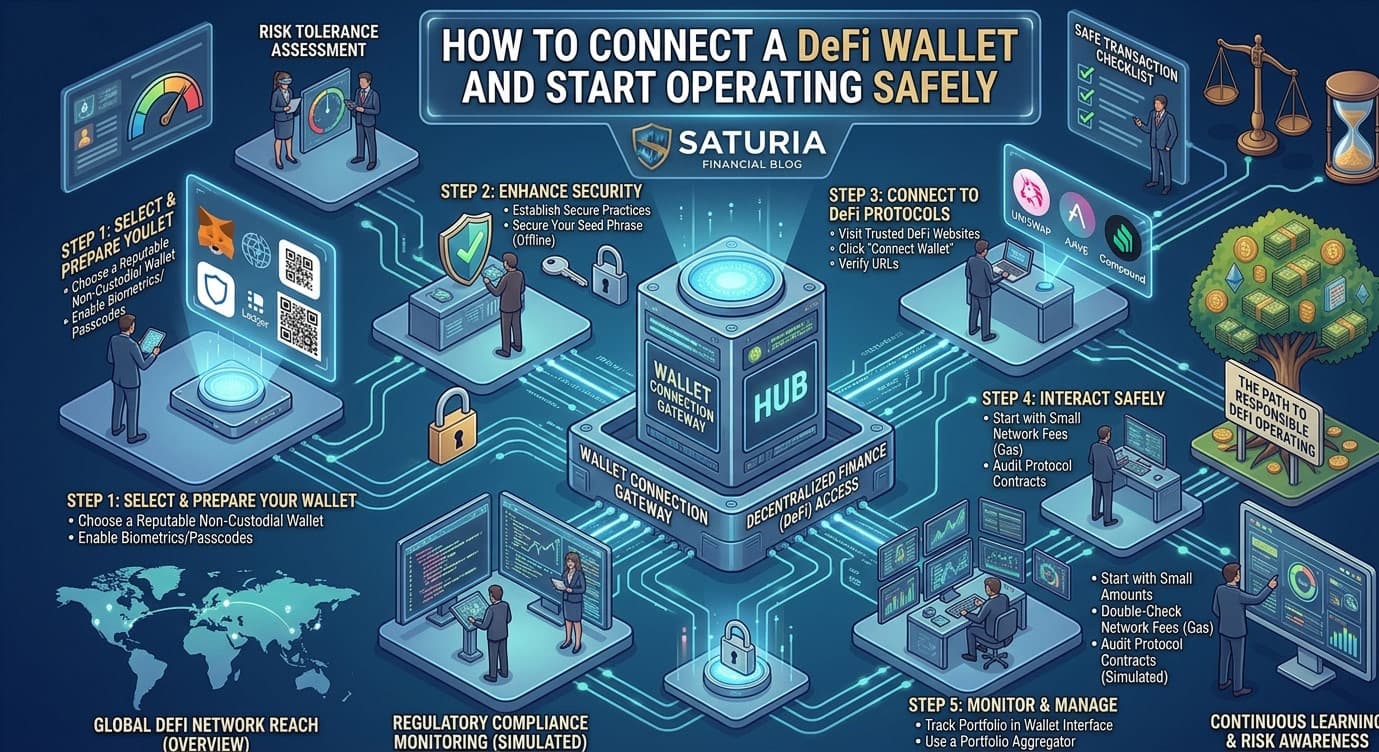
How to Connect a DeFi Wallet and Start Operating Safely
If you want to enter the world of decentralized finance, the first thing you need to do is choose and configure a DeFi wallet safely. Unlike centralized exchanges where the platform custodies your funds, in DeFi you're the custodian of your money.
In this comprehensive guide, you'll discover how to choose the right wallet, how to set up MetaMask, how to protect your seed phrase, and how to start operating safely.
What is a DeFi Wallet and Why Do You Need One?
A DeFi wallet is a program (software) or device (hardware) that allows you to:
- Control your cryptocurrencies independently
- Interact with DeFi protocols (staking, yield farming, trading)
- Send and receive cryptocurrencies
- Maintain full control of your private keys
Crucial difference:
- Exchange (CeFi): Custodies your funds. The platform has your private keys.
- Wallet (DeFi): You have control. Only you know your private keys.
According to the principle "Not your keys, not your crypto," to operate in DeFi you must own your wallet.
Types of DeFi Wallets
There are different types of wallets, each with pros and cons:
Hot Wallet (Online Wallet)
Software wallet installed on your computer or smartphone
Examples:
- MetaMask (browser extension)
- Trust Wallet (mobile)
- Phantom (Solana blockchain)
- Argent (Ethereum optimized)
Advantages:
- Easy to use
- Fast for frequent transactions
- Immediate access to funds
- Free
Disadvantages:
- Less secure (always connected to internet)
- Vulnerable to malware
- If your computer is hacked, funds are at risk
Best for: Active traders who operate frequently in DeFi
Cold Wallet (Offline Wallet)
Hardware wallet: a physical device that keeps keys offline
Examples:
- Ledger Nano S/X
- Trezor
- Coldcard
Advantages:
- Maximum security (keys remain offline)
- Protected from malware
- Ideal for large amounts
- Physical access needed for transactions
Disadvantages:
- Initial cost (50-200 EUR)
- Less practical for frequent trading
- If you lose the device, you still have access with the seed phrase
Best for: Hodlers holding large amounts long-term
Custodial Wallet
Managed by a third party (not recommended for DeFi)
Examples:
- Wallet on exchanges (Binance, Kraken)
- Wallet on crypto broker app
Disadvantages:
- You don't control the keys
- You can't operate in DeFi directly
- The platform can freeze your account
- Maximum risk
Not recommended for serious DeFi operations.
Complete Guide: How to Set Up MetaMask
MetaMask is the most popular wallet for Ethereum and other EVM-compatible blockchains. Here's how to set it up.
Step 1: Download and Install MetaMask
- Go to metamask.io
- Click "Download now"
- Choose your browser (Chrome, Firefox, Edge, Safari)
- Add the extension to your browser
- Verify MetaMask appears in the top right
Step 2: Create a New Wallet
- Click the MetaMask icon
- Select "Create a Wallet"
- Create a strong password (at least 12 characters)
- Read and accept the terms
Step 3: Save Your Seed Phrase (CRITICAL)
MetaMask will show you a sequence of 12 words - your seed phrase or mnemonic. This is THE MOST IMPORTANT thing about your wallet.
What to do:
- Write the 12 words on paper in exact order
- Store the paper in a safe place (safe deposit box, safe)
- Don't take digital screenshots
- Never send via email or messages
- Don't share with anyone
What NOT to do:
- ❌ Don't take photos with your phone
- ❌ Don't paste in digital notes
- ❌ Don't send to your cloud
- ❌ Don't share on social media
- ❌ Don't even show friends
Step 4: Confirm Your Seed Phrase
MetaMask will ask you to re-enter 3-4 words of your seed phrase in order. This verifies you saved it correctly.
If you forget your MetaMask password, you can recover your wallet using the seed phrase. If you lose the seed phrase, you lose your funds PERMANENTLY.
Step 5: Configure Backup
- Save MetaMask's backup file (it's not the same as your seed phrase)
- Encrypt the file if possible
- Store it in a separate location from your seed phrase
Step 6: Enable Advanced Security
In Settings > Security menu:
- Enable "Require confirmation for sensitive transactions"
- Activate auto-lock after inactivity (15 minutes)
- Enable alerts for suspicious transactions
How to Connect to DeFi Protocols
Once MetaMask is set up:
For Uniswap
- Go to uniswap.org
- Click "Launch App"
- Click "Connect Wallet" (top right)
- Select MetaMask
- Approve the connection in the MetaMask popup
- You're connected and can swap tokens
For Aave (Lending)
- Go to aave.com
- Click "Open App"
- Click "Connect Wallet"
- Select MetaMask
- Approve the connection
- You can now deposit and lend
For Curve (Stablecoins)
- Go to curve.fi
- Click "Connect Wallet"
- Select MetaMask
- Approve
- Provide liquidity or swap stablecoins
Important note: Connecting to a website does NOT give it access to your funds. MetaMask will always ask for approval before:
- Spending your tokens
- Sending transactions
- Signing messages
Best Security Practices for DeFi Wallets
Seed Phrase Protection
- Number of copies: 2-3 physical copies in different locations
- Physical protection: Safe, safe deposit box, bank
- Encryption: Consider splitting the seed phrase into parts
- Access: Only you must know it
MetaMask Password Protection
- Complexity: At least 16 characters, uppercase, lowercase, numbers, symbols
- Uniqueness: Don't use the same password elsewhere
- Storage: Save in a password manager (1Password, LastPass, Bitwarden)
Computer Protection
- Antivirus: Keep updated
- Firewall: Always active
- Windows/Mac updates: Apply security patches
- Secure browser: Use updated Chrome, Firefox, or Brave
- Extensions: Remove unnecessary extensions
Security During Transactions
When approving transactions:
- Read carefully what you're approving
- Verify the recipient address (first and last 4 characters)
- Check the token you're spending
- Verify the amount you're authorizing
- Note the contract address before approving
Be cautious of:
- Unlimited token approvals (instead approve just the needed amount)
- Connections from Twitter/Discord links that look like DeFi
- Popups asking to "verify your wallet"
Token Unlock and Vesting: Security Impact
An often-overlooked aspect is how token unlocks affect security. When a new token is unlocked:
- The price might crash
- Liquidity pools might become unstable
- Protocols might be attacked
Learn how to monitor token unlocks
With Saturia, you can receive automatic alerts when important tokens are unlocked, letting you protect yourself in advance.
Fund Segregation Strategies
If you own significant amounts of crypto:
"Spending" Wallet (Hot)
- MetaMask with limited amount
- For frequent DeFi operations
- Like the physical wallet you use daily
"Savings" Wallet (Cold)
- Ledger hardware wallet
- Most of your funds
- Access only when necessary
"Safety" Wallet (Backup)
- Extra seed phrase in secret location
- For fund recovery if loss occurs
Recovering Your Wallet if Lost
If you forget your MetaMask password:
- Click the MetaMask profile
- Select "Settings"
- Click "Reset Account" (or "Import account")
- Enter your seed phrase
- Create a new password
- You've recovered access
If you lose your browser:
- Install MetaMask on another browser
- Select "Import wallet"
- Enter your seed phrase
- Your funds are still there
If you lose your seed phrase: Your funds are lost PERMANENTLY and unrecoverable.
Monitor Your Wallet With Saturia
Once MetaMask is set up, you can connect it to Saturia for:
- DeFi Wallet Integration: Automatically import the balance of all your tokens
- Portfolio Management: View your total wallet value
- Alert System: Get notified of suspicious transactions
- Trading Dashboard: Monitor value in real time
- Security Monitoring: Alerts if your wallet receives unusual transactions
Learn the risk management guide
Wallet Setup Checklist
- Downloaded and installed MetaMask
- Created wallet with strong password
- Saved seed phrase on paper (2+ copies)
- Confirmed seed phrase in MetaMask
- Enabled auto-lock
- Updated browser to latest version
- Enabled antivirus on computer
- Verified you're on metamask.io (not fake sites)
- Connected to Saturia to monitor wallet
- Tested a small transaction before depositing large amounts
Common Mistakes to Avoid
- Don't save the seed phrase digitally - Paper or engraved metal
- Never share your seed phrase - Not even with technical support
- Don't approve tokens with unlimited amounts - Specify exact amount
- Don't connect to suspicious links - Always type the URL manually
- Don't ignore backups - Keep copies of seed phrase in safe places
- Don't use the same password everywhere - Unique for each important wallet
- Don't transact while stressed - Always verify twice
Conclusion
Setting up a DeFi wallet correctly is the crucial first step to operating safely in decentralized finance. The security of your seed phrase is the absolute priority - it's the only thing you need to recover your funds if everything else fails.
Remember:
- Your seed phrase is the key to your crypto kingdom
- MetaMask is an extraordinary tool but it's your responsibility to protect it
- Start with small amounts until you feel confident
- Always monitor your movements with tools like Saturia
Once your wallet is secure, you're ready to:
Set up your DeFi wallet today with Saturia - the dashboard that helps you monitor and protect your investments 24/7.